Stanford ME310 · Lenovo & Galbot · Sept 2025 – June 2026
Matchbox
Wearable Technology to Spark Conversation
Project video
How to use it
Compressed copies for the web. The project video and both quarterly reports are archived at full quality in the Stanford Digital Repository under a persistent identifier, licensed CC BY-NC 4.0.
Matchbox is a smart, wearable matchmaking module built to reduce social friction at large events — conferences, conventions, and trade shows. It attacks a specific failure: people with genuinely relevant shared interests are often standing a few feet apart and never connect. Matchbox keeps the introduction itself in the physical world, building on the familiar conference lanyard so that nobody has to stare at a phone to meet the person next to them. A companion web app sits behind the badge for everything the moment cannot hold — setting up your profile beforehand, and afterward remembering who you met, what you had in common, and how to reach them. The wearable starts the conversation; the app is what keeps it from ending when the event does.
- Course
- ME310 Design Innovation, Stanford University — a year-long, industry-sponsored capstone
- Team
- Team Wearables — 12 students across three universities, with five advisors
- My focus
- Backend and matching service, badge firmware, companion web app, and user research
The problem we found
We spent the fall on needfinding: user interviews, benchmarking existing wearables, and rough prototypes. Talking to conference-goers, event operators, and wearable-sensing researchers, one pattern kept surfacing. At a large event, the limiting factor is rarely a shortage of relevant people in the room — it is that you cannot tell who they are, and manufacturing an introduction feels awkward enough that most people skip it.
Phone-based event apps address the discovery half of that problem and make the awkwardness worse: you end up looking at a screen while standing next to the person you were supposed to meet. One interviewee, a wearable-sensing researcher, put the constraint bluntly — everything we were describing is technically possible on a smartwatch, but people do not want more apps or more notifications. So we aimed for a single-purpose device that lives in the lanyard people are already wearing, and that signals ambiently rather than demanding attention.
How it works
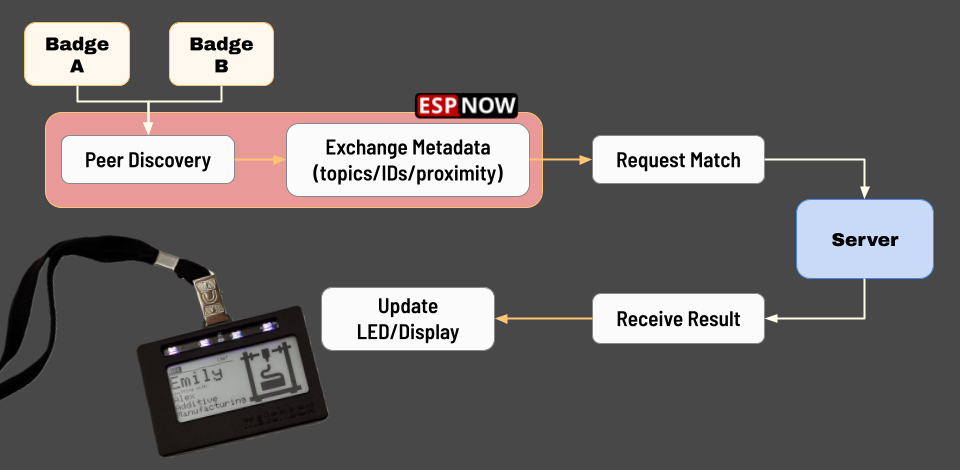
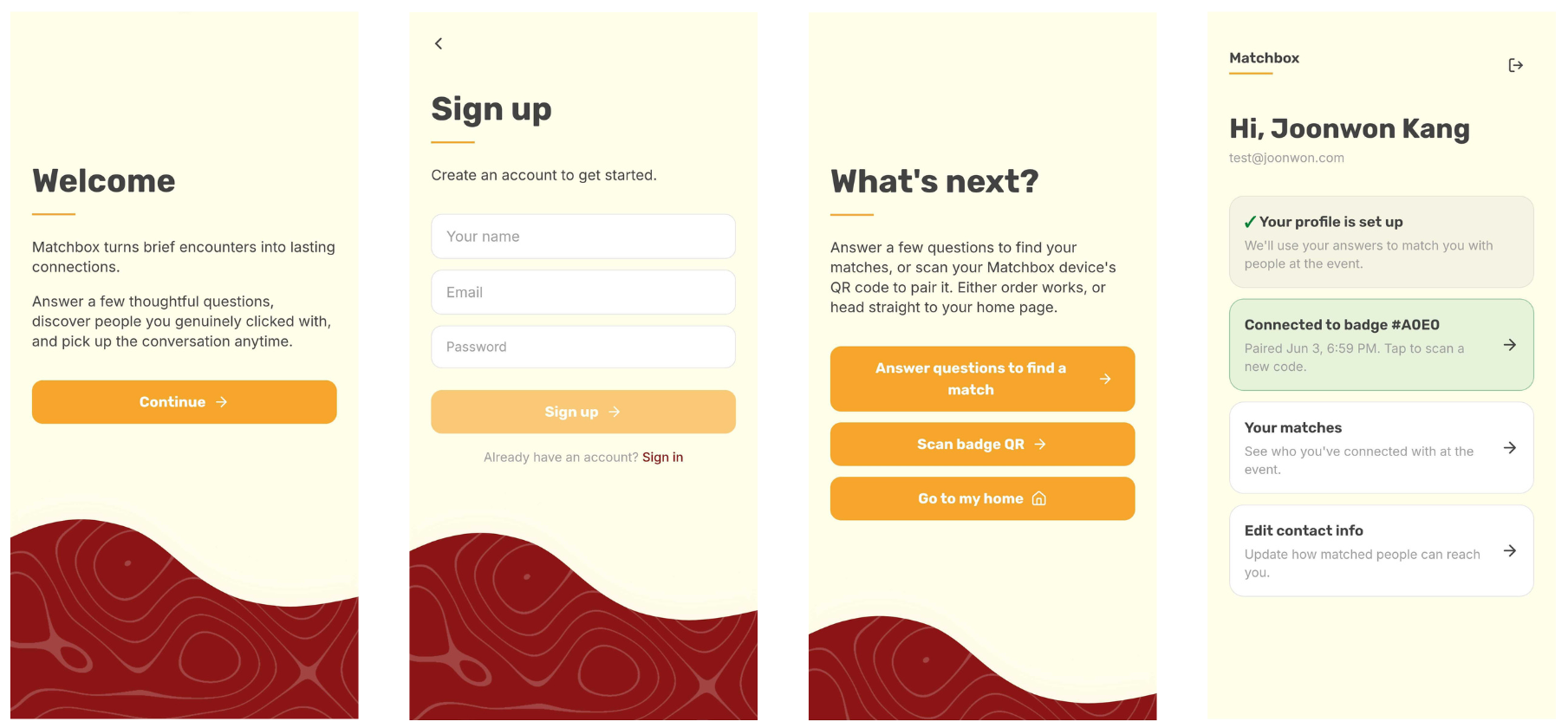
- Onboarding. The badge displays a QR code linking to the companion web app. A participant signs in, redeems a one-time pairing token that binds that physical badge to their account, and fills out a short profile survey.
- Search mode. The badge stays quiet while the wearer moves around the event. It discovers nearby Matchbox badges over ESP-NOW, asks the backend whether the two paired users share a meaningful interest, and does nothing when the answer is no. There is no list of nearby profiles to browse.
- Match. On a hit, both badges flash the same LED color and both wristbands show the matched person’s name and a suggested topic. The shared color is how you find each other in the room.
- Chat mode. Each person presses their wristband button to accept. Only after both accept does the match appear in the app, with the contact details each person chose to make public.
- Back to search. Another button press returns the badge to search mode so it can look for someone new.
The same hardware also supports a deliberate exchange outside the algorithm. If two people meet organically, they hold their wristbands together for a few seconds; the wristbands confirm mutual close-range proximity and put both badges into chat mode, producing the same confirmed contact swap without anyone touching the badge on their chest.
Privacy was a design constraint, not a footnote
Survey answers are used privately as matcher input and are never shown to other users. What other people see is a separate, user-controlled public introduction, and contact information is released only on mutual acceptance. That ordering matters: it means a saved contact represents two people who actually wanted to talk, not an algorithm's suggestion.
Hardware
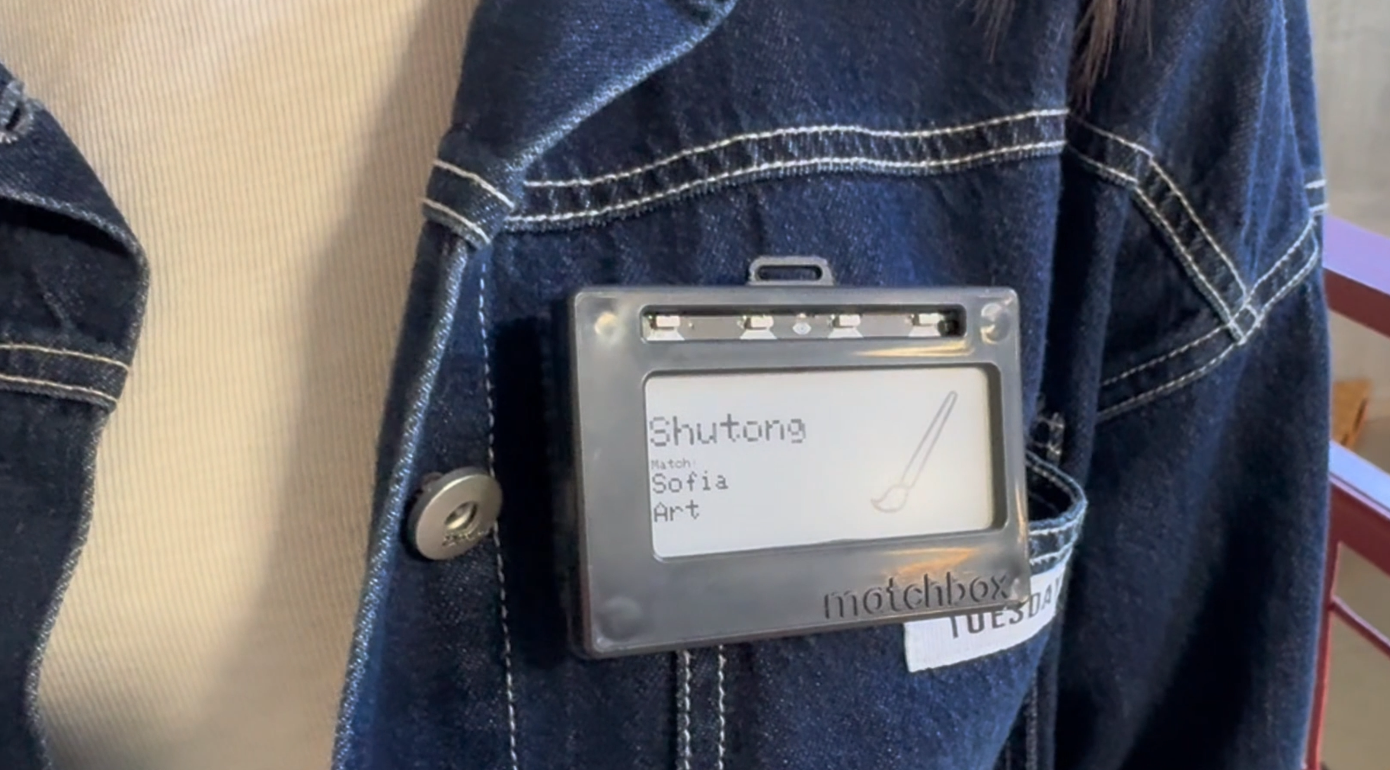
The badge is built around an Adafruit MagTag — an ESP32 wireless module paired with a low-power 2.9″ e-ink display — plus a strip of NeoPixel LEDs for match signalling and a 3.7 V 420 mAh LiPo cell. E-ink was the right call for a device worn all day: it holds the last frame at zero power, so the badge is readable as an ordinary name tag even between refreshes.
The enclosure is a modular two-part shell that accepts either magnetic standoffs or a lanyard, so the same electronics work for events with different badge conventions. We validated the covers for injection molding with flow, sink, and warpage simulations rather than only printing them. The full bill of materials came to about $73 per unit at prototype quantities.
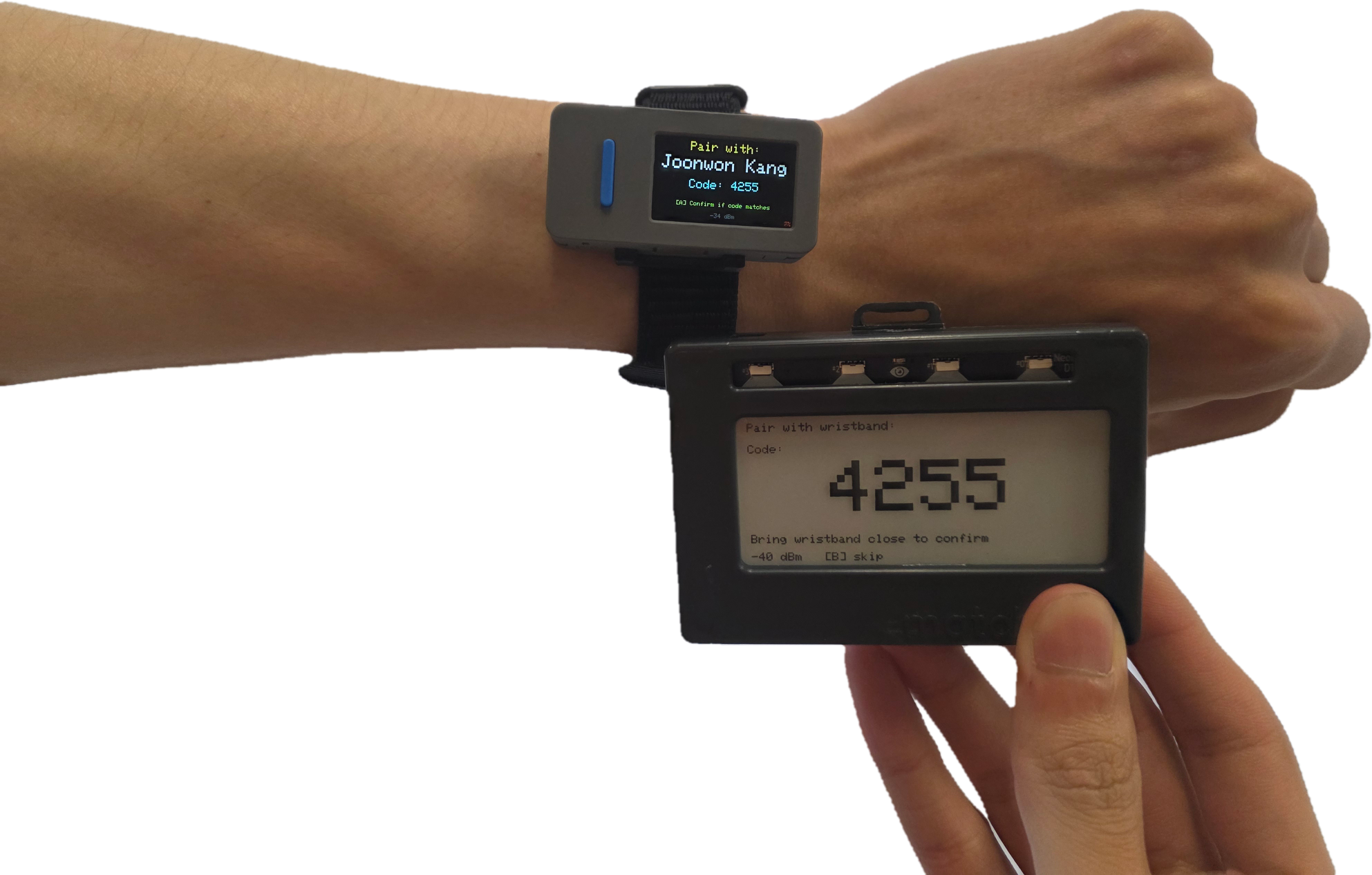
Splitting the system into two wearables was one of our more consequential decisions. The badge is inherently public — it faces outward, and anyone can read it. That makes it a bad place to put controls, because accepting or dismissing a match would mean poking at your own chest in front of the person you are deciding about. The M5Stack StickS3 wristband became the private surface: a wrist-level display, a single button, and a close-range gesture. Public signal and private control, physically separated.
Software
The system splits into four codebases: badge firmware, wristband firmware, the backend, and the web app. The two firmware targets own the real-time wearable interaction; the backend and web app own accounts, pairing, profile data, matching, and contact exchange.
Badge firmware
Arduino C++ on the ESP32. An early prototype was written in CircuitPython and edited live over the board’s USB drive, which was excellent for iteration speed and eventually the wrong tool — we moved to Arduino C++ for finer control over ESP-NOW, the e-ink refresh strategy, and HTTP behavior. The firmware handles the pairing handshake, the wristband link, peer discovery, server match resolution, search/chat mode switching, and LED feedback.
Backend and matching
A plain-PHP LAMP application (Apache, PHP, MariaDB) exposing three separately authenticated surfaces: badge-facing endpoints keyed with a shared application key, bearer-token endpoints for the web app, and a tailnet-only admin interface. The schema deliberately keeps the physical device layer separate from the user layer, and private survey answers separate from public contact fields, so the matcher and the app read from different tables.
Attendee-to-attendee matching runs on Gemini 2.5 Flash, which returns a structured decision: match or no match, a short conversation topic, and the filename of an icon the badge can render. Its internal reasoning is logged for debugging but never surfaced to users.
The latency design exploits something specific about this interaction. Model calls are slow relative to a web request, but nobody is waiting on this one — two people walk past each other, and the first they know about the system is their badges lighting up. So the server never blocks: it validates the badge IDs, resolves them to profiles, checks a pair cache, and either returns a cached result or stores a pending request for a background worker to complete. A cache miss looks like nothing at all, rather than a spinner.
Web app
React, Vite, and TypeScript, deployed to Vercel. It covers account creation, badge pairing, the profile survey, the confirmed-match list, and the exhibitor dashboard. Post-event, it is where a match becomes a durable record — who you met, what you had in common, when it happened, plus a private rating and notes for follow-up.
The trade-show variant
Trade shows invert the problem: an attendee usually wants the right booth, not a peer. So we built a second flow. The attendee deliberately touches their wristband to an exhibitor’s, the backend picks the most relevant exhibitor for that attendee’s profile, both badges display complementary conversation-starting content, and the exhibitor can review the visitor in a dashboard afterward.
This path runs on Gemini 2.5 Flash Lite rather than Flash. The reasoning is the mirror image of the peer flow: here the model call happens after a deliberate face-to-face gesture, so two people are standing there watching. A full Flash call can take around ten seconds, which is a long time to stand still. Lower latency mattered more than matching quality.
What was mocked. The exhibitor flow used pre-seeded fictional startup profiles, not a live booth network. A real trade-show deployment would need many genuine exhibitor accounts, staffed booths, and event-specific booth metadata, which was beyond what we could stand up.
The parts we cared about testing were intact: the deliberate wristband gesture, backend exhibitor selection from a real attendee profile, complementary badge content, and the visitor record for follow-up.
My role
Matchbox was a twelve-person project across three universities, so this page describes work that was mostly not mine. My own contributions were concentrated in the backend and matching service, the badge firmware, and the companion web app — roughly, the path from two badges noticing each other to a contact saved in the app. I also took part in the fall needfinding, running and writing up user interviews on how people actually approach networking events.
One property of the system shaped much of that work: a single match spans two badges, two wristbands, an ESP-NOW exchange, and an asynchronous server round-trip, and a failure at any one of those joints looks identical from the outside — the LEDs simply do not light up. Debugging therefore had less to do with any individual component than with making state legible across the whole chain.
Team
Team Wearables: Eli Jones, Joonwon Kang, Laura Sun, Marisa Woo, Fengxian Su, Michael Li, Ruxin Xu, Shutong Zou, Siying Li, Sofia Jang, Tongyu Wang, and Jingyi Zhang.
Advisors: Mark Cutkosky, George Toye, Andrew Milne, Adrit Lath, and Weiping Li.
Stanford Mechanical Engineering Design Group, with Peking University and USTC as global design partners, sponsored by Lenovo and Galbot.